
Textaizer Pro4.3 - Download
You'll be able to download in few seconds.
Publisher Description
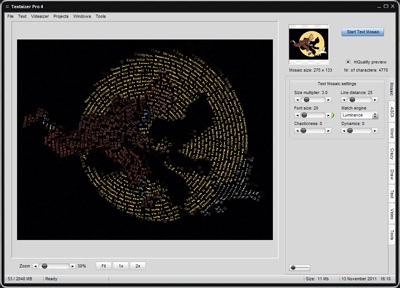
The best free text mosaic creator on the web. Limitless painting with text to create surprising photorealistic effects. With Textaizer Pro you can make great fun effects from pictures by repainting the picture from text. This is also known as ASCII art, but more versatile because you can use your own text (song lyrics, love poems or anything else). Textaizer Pro is freeware from the makers of Mosaizer Pro.
Possibilities with Textaizer Pro:
- build any picture (bmp, jpg) from text
- build genuine ASCII art text files and the corresponding bitmaps
- crazy characters: drawing with characters
- free drawing of ASCII art, possibility to use an underlying picture for perfect copy/drawing
- apply a surface texture for a realistic 3D look
- video functionality: text art compiled as a video clip
- create an ASCII art file from a free-hand mouse-drawn picture
- use of extended ASCII characters to create full-body ASCII art pictures in HTML
- two creative modes: follow the original source color ('colorize') or create a 3D or 'emboss' effect
- save as text, bitmap, scaleable vector, HTML and avi formats
- large screensize result viewer with seamless zooming
- use a white rim around the source to create an artistic painting effect; great for portraits
- use any fontstyle and any fontsize you like
- multiple font ('random font')
- multi-language support
- pre-sets (save, load) for conveniently repeating popular effects
- automatic white space trimming (useful for multiple fonts) to avoid gaps in the result
- output as bitmap and as ASCII file (for the ASCII art generation)
- three image enhancement filters to optimize the picture before making a ASCII art of text mosaic
About Textaizer Pro
This Editors program is available in English, Dutch, German. It was last updated on 29 September, 2026. Textaizer Pro is compatible with the following operating systems: Windows.
The company that develops Textaizer Pro is APP Helmond. The latest version released by its developer is 4.3.
The download we have available for Textaizer Pro has a file size of 2.1 MB. Just click the green Download button above to start the downloading process. The program is listed on our website since 2013-03-26 and was downloaded 0 times. We have already checked if the download link is safe, however for your own protection we recommend that you scan the downloaded software with your antivirus. Your antivirus may detect the Textaizer Pro as malware if the download link is broken.
How to install Textaizer Pro on your Windows device:
- Click on the Download button on our website. This will start the download from the website of the developer.
- Once the Textaizer Pro is downloaded click on it to start the setup process (assuming you are on a desktop computer).
- When the installation is finished you should be able to see and run the program.
Program Details
System requirements
Download information
Pricing
Version History
version 4.3
posted on 2013-03-26
Save as pdf, multiple pages
version 3.0
posted on 2008-12-25
Interface redesigned, textures added, multi-language support, SmartPrinting, presets
Disclaimer
External Download
We do not host Textaizer Pro on our servers. We did not scan it for viruses, adware, spyware or other type of malware. This app is hosted by the software publisher and passed their terms and conditions to be listed there. We recommend caution when installing it.
The external download link for Textaizer Pro is provided to you by apps112.com without any warranties, representations or guarantees of any kind, so access it at your own risk.
If you have questions regarding this particular app contact the publisher directly. For questions about the functionalities of apps112.com contact us.
